
To determine whether you need to use one Agent Number or separate as a firm/new Lodgeit account, consider the following guidelines:
1. Using One Agent Number
- If you are managing lodgements for a single entity or practice, you can use one Agent Number (Tax Agent Number or BAS Agent Number) to lodge forms.
- This is suitable if all your clients or lodgements are under the same firm or organization and do not require separate management.
2. Separating as a Firm/New Lodgeit Account
You should consider separating into a new Lodgeit account or firm if:
- You manage multiple entities or branches: For example, if you are a Tax Agent with different firms or branches, each with its own set of clients and TAN/BAN.
- You need to use multiple Agent Numbers: Lodgeit allows different TAN/BAN numbers across the "Switch Organisation" feature. This is useful if you need to lodge forms for different entities with separate Agent Numbers.
- You want to maintain separate client lists: Each organization in Lodgeit maintains its own client list, lodgement history, and settings.
- You are a BAS Agent: BAS Agents are not allowed to lodge tax forms directly. In this case, you need to create a separate "Business" account to lodge tax forms. Refer to the BAS Agent/Bookkeeper to Lodge Tax Form guide for detailed steps.
Steps to Separate as a New Lodgeit Account
Switch Organisation:
- Click the gear icon (⚙️) in the top-right corner of the Lodgeit interface.
- Select "Switch Organisation" from the dropdown menu.
- Click the "Add" button to create a new organization.
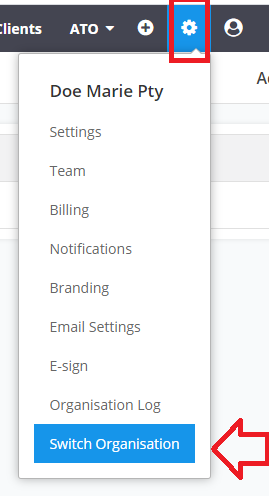
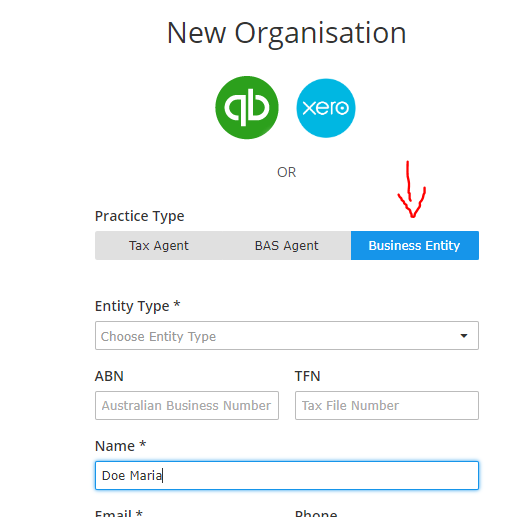
Set Up the New Organisation:
- Choose the appropriate "Practice Type" (e.g., Tax Agent, BAS Agent, or Business Entity).
- Enter the required details such as ABN, TFN, and contact information.
Manage Separate Accounts:
- You will now have two separate accounts (e.g., one for "ABC Bookkeeper Services" as a BAS Agent and another for "ABC Pty Ltd" as a Business Entity).
- Note that lodgement credits for each account are separate and can be purchased as needed. View Pricing Details.
Additional Notes
- Franchisee Licenses: If you are a Tax Agent managing multiple firms, you can use the "Franchisee License" feature to manage multiple TANs. Learn more about Franchisee Licenses.
- Cost Implications: Additional costs apply for creating new organizations or using multiple TANs. For example, $300 ex GST ($330) is charged for a second TFN.