
If you do not want to use the “Manage Tax Returns” feature for multiple clients in Lodgeit, you can deactivate it in bulk by updating and re-importing your client list.
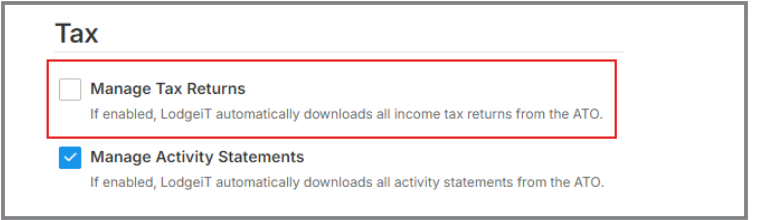
Step 1: Export Your Client List
Go to your Client List in Lodgeit.
Export the file (you can choose Excel or CSV format).
If you download it as Excel, make sure to save the final version as a CSV file before importing it back.
Refer to the guide: Client Export/Extract (CSV or Excel).
Step 2: Edit the CSV File
Open the exported file.
Locate the column named “Manage Tax Returns.”
Change the value for the clients you want to deactivate to "N"
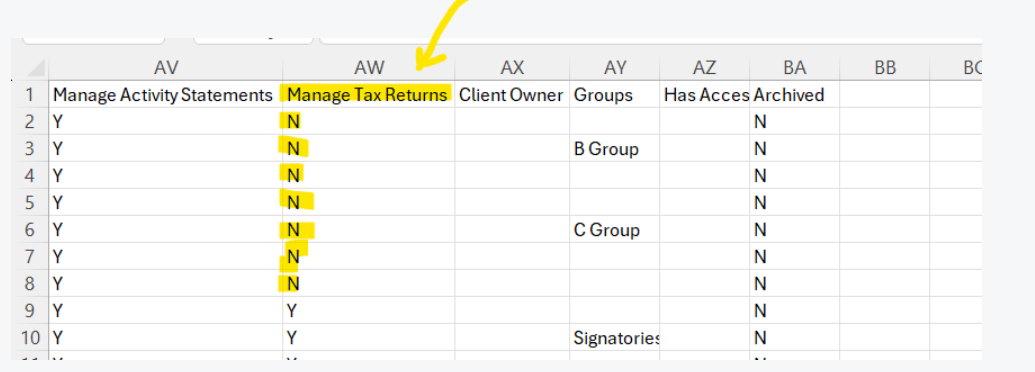
N = No to “Manage Tax Returns”
4. Save the file as CSV (Comma delimited) format.
Step 3: Import the Updated CSV File
Go back to Lodgeit.
Import the updated CSV file.
Very Important: Tick the checkbox “Update details of the existing clients” before proceeding. Learn more
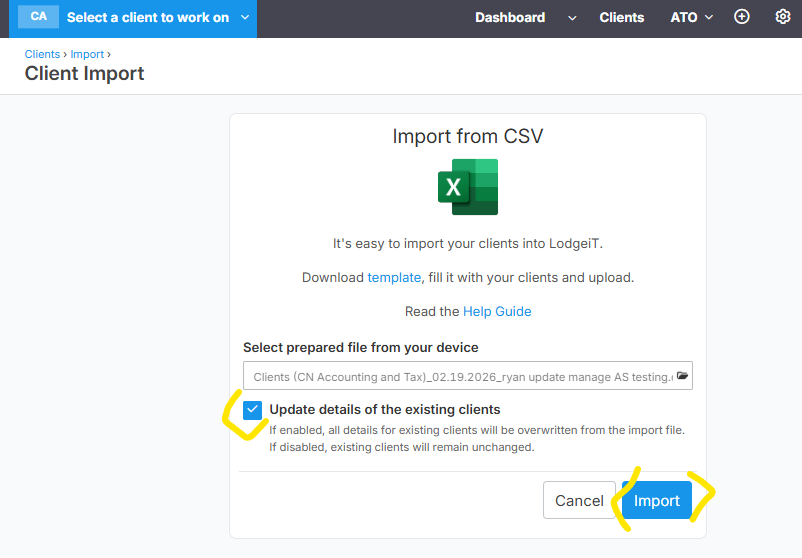
4. Complete the import process. Learn more
Result
Once the import is completed, the “Manage Tax Returns” feature will be deactivated for all clients where the value is set to N.