
First, make sure that "Manage Tax Returns" and "Manage Activity Statement" activated in order to automatically load forms as soon as they produced. 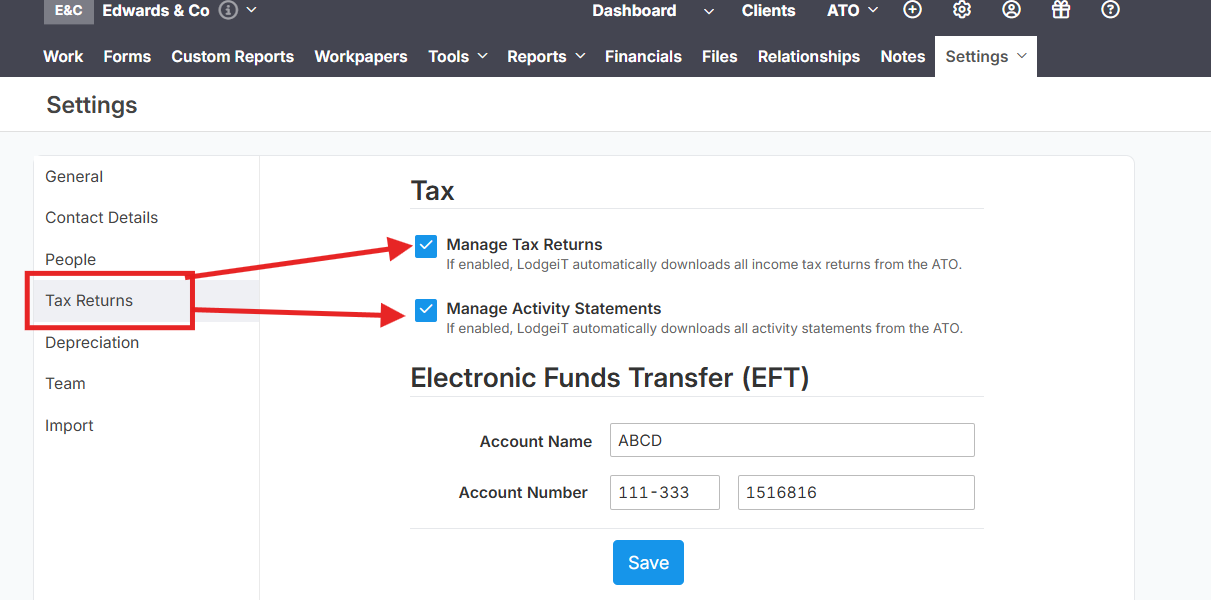

ITR - Preparation of an Individual Tax Return (ITR)
CTR- Preparation of Company Tax Return
TTR - Preparation of Trust Tax Return
PTR - Preparation of Partnership Tax Return (PTR)
TFND - Preparation of TFND Form (Tax File Declaration)
FBT - Preparation of FBT Return Form (Fringe Benefit Tax Return)
PS - Preparation of PAYG Payment summary
FTER - Preparation of FTER Form ( Family Trust Election, Revocation or Variation )
IEE - Preparation of IEE Form ( Interposed entity election and or revocation )
TPAR - Preparation of TPAR Form
CGNFT - Preparation of CGNFT Form (Consolidated Groups Notification of Formation and Member Entrance/Exit)
RNN - Preparation of RNN Form ( Return/Further Not Necessary )
AS - How to Complete an Activity Statement
NEW Forms
Lodgeit by default starts pulling tax returns of new Financial Year only once this Financial Year started, for example until the 1 July 2026 forms of FY 2026 will not be created automatically, it starting to create approximately 3 days after the new Financial Year stared.
For Activity Statements - they are creating in a timely manner according to ATO lodgment dates, i.e. every month, quarter. They are not creating in advance.
Related Articles:
Form not showing on the 'Add' options
How to Export List of Tax Forms
Form Workflow Sequence and E-signature
Dashboard - Work status filter and sort (team, form, period, client group)