
Scenario:
John Doe is currently accessing Lodgeit through his QuickBooks app. He wants to switch and sign in directly to Lodgeit.
Steps to Resolve:
1. Sign-in
Access Lodgeit from your QuickBooks
2. Access Account Settings
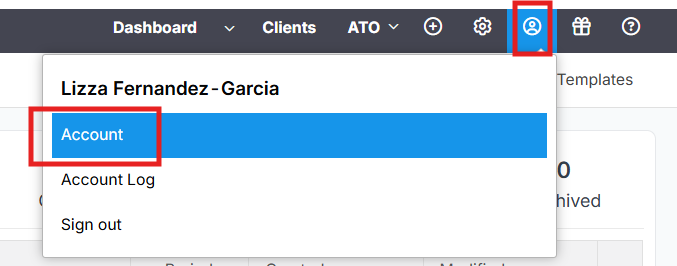
Once logged in, click on the human icon (profile icon) or open the “Account” menu.
3. Link Your Intuit (QuickBooks) Account
In Account Settings, select the option to connect or link your Intuit profile.
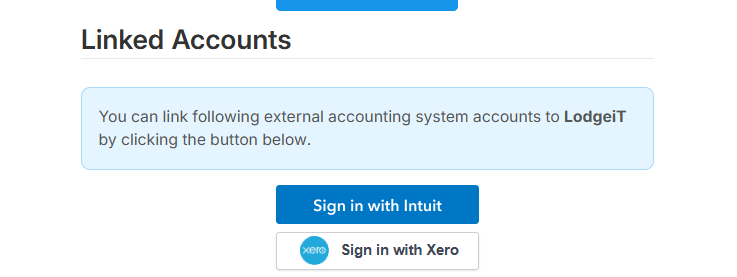
This creates a secure connection between your Lodgeit account and your Intuit account.
4. Use Intuit Sign-In for Future Access
After linking, you can now log in to Lodgeit directly using the “Sign in with Intuit” option.
Login via https://go.lodgeit.net.au/ 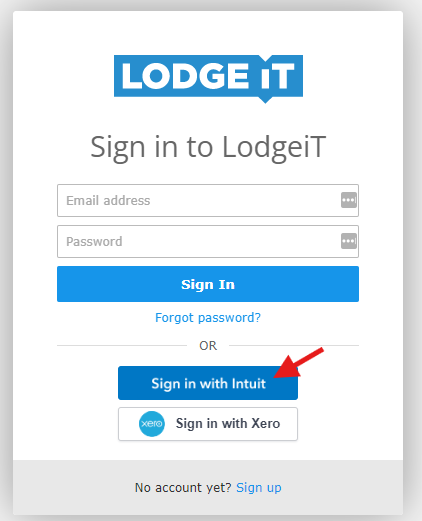
Related guide: To use QuickBooks Credentials to Sign-in to Lodgeit