
To confirm whether your CTR form has been successfully submitted to the ATO, please follow the steps below within Lodgeit:
Step 1: Check the Lodgment Status on the Forms Dashboard
- Navigate to the Forms Dashboard in Lodgeit.
- You can find the "Forms Dashboard" in the top navigation bar of the Lodgeit interface.
- Look for the specific CTR form you have completed.
 This image shows how to locate the Forms Dashboard in Lodgeit.
- Locate the statusof your CTR form in the dashboard. The status will indicate whether the form is:
- Pending
- Processing
- Processed
- ATO: Queued
- Missing
- Error
- Cancelled
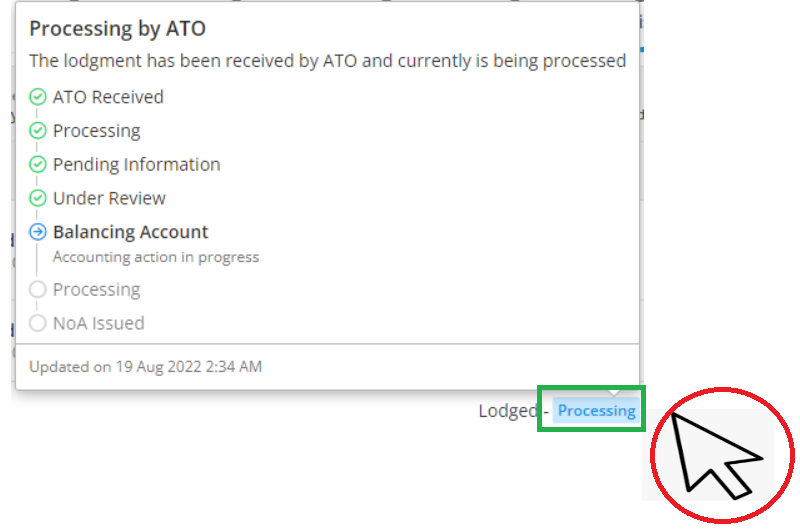
Step 2: Hover Over the Status for Detailed Progress
- Once you find your CTR form, hover your mouse over the status indicator (e.g., "Processing" or "Processed").
- A detailed progress window will appear, showing the stages of the lodgment process.Image Reference:
Step 3: Verify on the ATO Portal
If the status in Lodgeit shows as Processed, you can log in to the ATO portal to confirm the submission. The form should be visible there.
Log in to the ATO Online Services (via myGovID or the relevant ATO portal).
Navigate to the Lodgments or Forms History section.
Check if the CTR form appears as received or processed.
This step is useful for cross-checking Lodgeit’s status with the ATO’s records.
Prepare your for receipt: How to see Lodged Form / Lodgement Receipt
Step 4: Contact the ATO (If Necessary)
If you are unsure or need further confirmation, you can contact the ATO directly:
Contact the ATO directly and provide:
Entity details
Lodgment date (if available)
Form type (CTR)
The ATO can confirm whether the form has been received or is still under review.
- Tax Practitioner Assistance Line: 13 72 86
- Fast Key Codes: 3, 2, 1
- Operating Hours: 8:00 AM to 6:00 PM, Monday to Friday (excluding public holidays)