
Error: CMN.ATO.IITR.730150

Solutions:
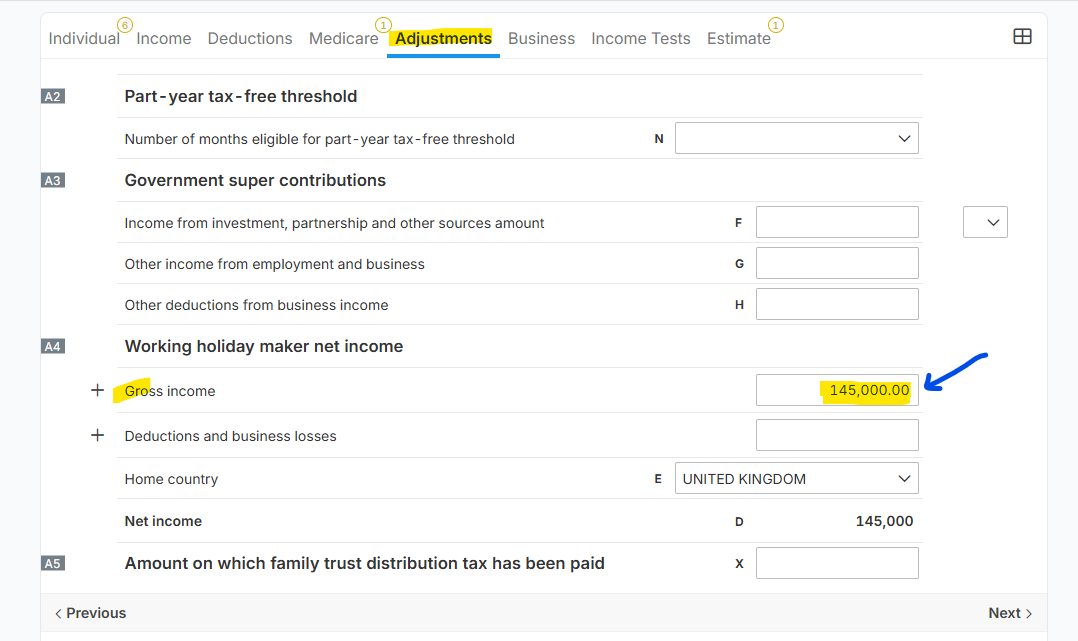
A. If the working holiday maker data is relevant to the tax form, then you need input an amount in A4 under "Gross Income" line item of the Adjustments section.
*Below image shows on how to input an amount on A4:
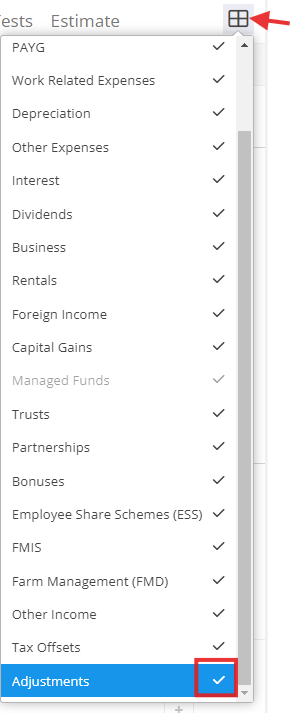
B. If "Working holiday maker" is not relevant, just make sure to deactivate "Adjustments" via financial image.
*Below image shows the location of the Adjustments section. Just untick check if you need to deactivate it:
If you need to deactivate the Adjustment section, then the next thing to do is to check the Income > PAYG > Salary or Wages. Update Item 1 question "Was the salary or wages gross income amount earned while the individual was on a working holiday visa (417 or 462)? " should set as "No".
NOTE: In case the tax form has multiple Payg worksheets, you need to open all the worksheets and check its details in Item 1 related to working holiday maker.
