
Overview
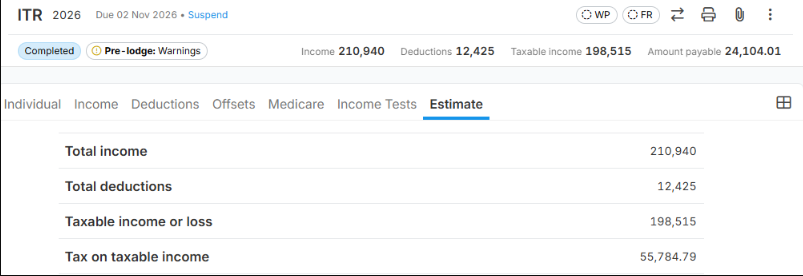
If the Tax on Taxable Income amount in a LodgeiT Individual Tax Return (ITR) appears incorrect, review the taxpayer's personal details, tax residency settings, applicable rebates and offsets, and any income items that may receive special tax treatment.
TABLE OF CONTENTS
- Possible Causes and Troubleshooting Steps
- Verify the calculation using the ATO calculator
- If the tax calculation still appears incorrect, Lodgeit team will investigate
Possible Causes and Troubleshooting Steps
1. Verify the taxpayer's Date of Birth
Check that the taxpayer's date of birth has been entered correctly in the tax return.
Confirm that the day, month and year are correct.
Check whether the taxpayer is under 18 years old.
Minors may be subject to special tax rates on certain types of income, including eligible unearned income. These rates can be higher than ordinary individual tax rates.
Not all income received by minors is taxed at the highest rate; exceptions apply depending on the income type and circumstances.
Action: Correct any incorrect date of birth and recalculate the tax return.
2. Review the tax settings
Check that the taxpayer's circumstances and applicable tax settings have been entered correctly.
Review the following:
Residency status: Confirm whether the taxpayer is an Australian resident or foreign resident for tax purposes.
Rebates and offsets: Verify that the selected rebate, tax offset or other applicable options are correct.
Zone or special-area options: Check whether the taxpayer is eligible for a zone tax offset or another relevant concession.
Other relevant details: Review any additional settings that may affect the taxpayer's tax calculation.
Incorrect settings may cause the calculated tax to differ from the expected amount.
Action: Correct any inaccurate selections and recalculate the return.
3. Check Employment Termination Payments (ETP)
Review the return for any Employment Termination Payment (ETP) entered under the relevant income section.
For example, the return may contain an ETP of $12,453 with code O.
An ETP is a payment received in consequence of the termination of employment. Certain ETP components may qualify for concessional tax treatment, subject to applicable eligibility rules, age, payment type and relevant tax caps.
Code O generally identifies an other life benefit ETP, such as a golden handshake, gratuity or payment in lieu of notice.
The applicable tax treatment depends on the ETP's taxable component and the taxpayer's circumstances. Do not assume that every ETP is taxed at the same rate or that the entire payment automatically qualifies for a concession.
Action:
Confirm that the ETP amount matches the taxpayer's income statement or payment summary.
Verify that the correct ETP code has been selected.
Check the taxable component and any tax withheld.
Confirm that the payment has been entered in the correct section of the return.
Recalculate the return and review the resulting tax amount.
Verify the calculation using the ATO calculator
You can compare the expected result with the Australian Taxation Office's Simple Tax Calculator:
https://www.ato.gov.au/Calculators-and-tools/Simple-tax-calculator/
Use the calculator for a general comparison, ensuring that you select the correct income year and enter the relevant income and deductions accurately.
Important: The ATO Simple Tax Calculator may not reproduce the full LodgeiT result where the return includes ETPs, special tax rates, offsets, Medicare levy adjustments or other complex circumstances. A difference between the two results does not, by itself, confirm a LodgeiT calculation error.
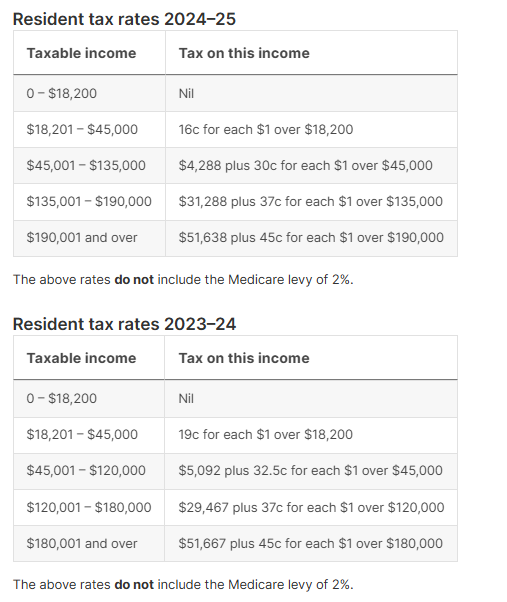
To calculate the tax on your taxable income, you need to follow the tax rates and thresholds set by the Australian Taxation Office (ATO) for the relevant financial year. The taxable income is the amount on which you will be taxed after accounting for allowable deductions from your total income.

Consider the "Resident Tax Rates"
If the tax calculation still appears incorrect, Lodgeit team will investigate
If you have reviewed the details above and believe the calculation remains incorrect, contact LodgeiT Support and provide the following information:
1. Manual tax calculation
Provide a breakdown showing how you calculated the expected tax payable or refund. Include the relevant income, deductions, taxable income, applicable tax rates, offsets, levies and other adjustments, where relevant.
2. Copy of the tax form
Provide a copy of the completed tax return showing the relevant income details, selections and calculated tax amount.
Where possible, identify the specific label or section in which the calculation appears incorrect.
For privacy and security, ensure that any documents are shared through the approved support channel and that unnecessary sensitive information is protected.
Providing these details will help the support team investigate the discrepancy more efficiently.