
Scenario: You would like to display “Bank Fees” and “Borrowing Charges” separately in your financial statements. Currently, both are grouped under “Bank Charges.”
Option 1: Ungroup the Accounts in the Financial Report (Quickest Method)
Follow these steps:
Open your Financial Statement report.
Locate “Bank Charges.”
Click the arrow icon on the left side of the line item to expand and show the breakdown of accounts mapped under it.
Once expanded, click the “Ungroup” button.
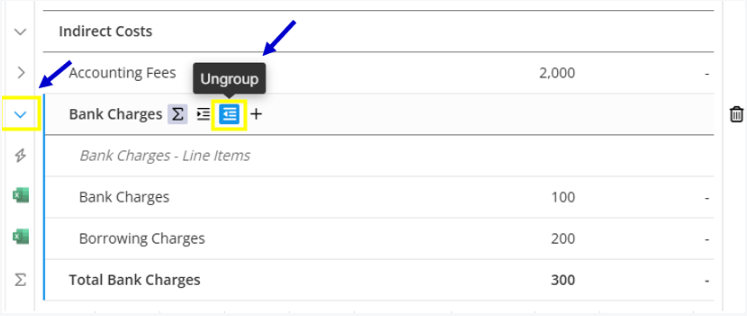
The sub-accounts (including Bank Fees and Borrowing Charges) will now display separately in the report.
This allows each account to appear individually instead of being consolidated under one heading.
Option 2: Update the Account Mapping (Alternative Method)
If you prefer a more permanent structural change:
Go to your Chart of Accounts.
Locate the account “Borrowing Charges.”
Update its mapping to a different expense category (separate from Bank Charges).
For detailed steps, refer to the guide:
Chart of Accounts and Mapping
Recommendation
If you only need separate visibility in the report, use Ungroup.
If you want them permanently categorized differently moving forward, update the account mapping.