Livestock Schedule is only available via Finacial Report Pro version for Individual, Company, Trust and Partnership.
1. Overview and Methodology
- Tax-Basis Alignment: This Livestock Schedule is a deterministic calculator built specifically for Special Purpose Financial Reporting (SPFR). It mirrors standard ATO tax-basis mechanics, calculating inventory valuation strictly under the Average Cost Method.
- Ledger Integration: The schedule acts as the bridge between physical farm metrics (headcount) and the financial ledger. The underlying engine automatically dilutes the pool and handles the complex gross profit reconciliation to ensure the final ledger facts are perfectly auditable.
- Scope Limitation: This module does not support Fair Value Less Costs to Sell (FVLCTS) calculations required for General Purpose Financial Statements under AASB 141 / IFRS.
Select "Custom Reports" > "Add Report", and choose "Financial Report Pro"


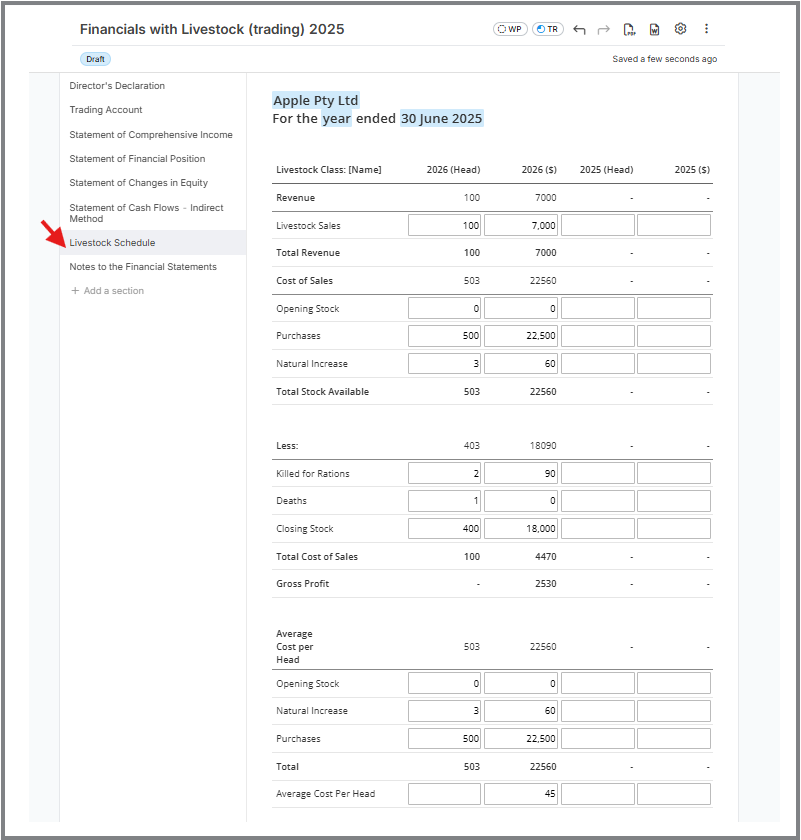
2. Pertinent Operational Information for Users
- Handling Natural Increase: Entering headcount for natural increase alongside the prescribed statutory value (e.g., $20/head) will automatically inject that value into the Total Stock Available pool. It does not require a separate P&L revenue line item.
- Killed for Rations (Action Required): When entering livestock taken for rations, the user must input a deduction value equivalent to the headcount multiplied by the calculated average cost. This ensures the private use of stock is stripped out of the Cost of Sales and properly journaled to Equity/Drawings.
- Losses by Death (Leave at $0): When recording dead stock, enter the headcount but leave the deduction value at $0. This deliberately leaves the financial cost of the deceased animal absorbed within the "Total Cost of Sales" pool to ensure it acts as a legitimate business deduction against trading revenue.
3. Known UI Behaviors & Display Shortcomings (The "Read Me First" Section)
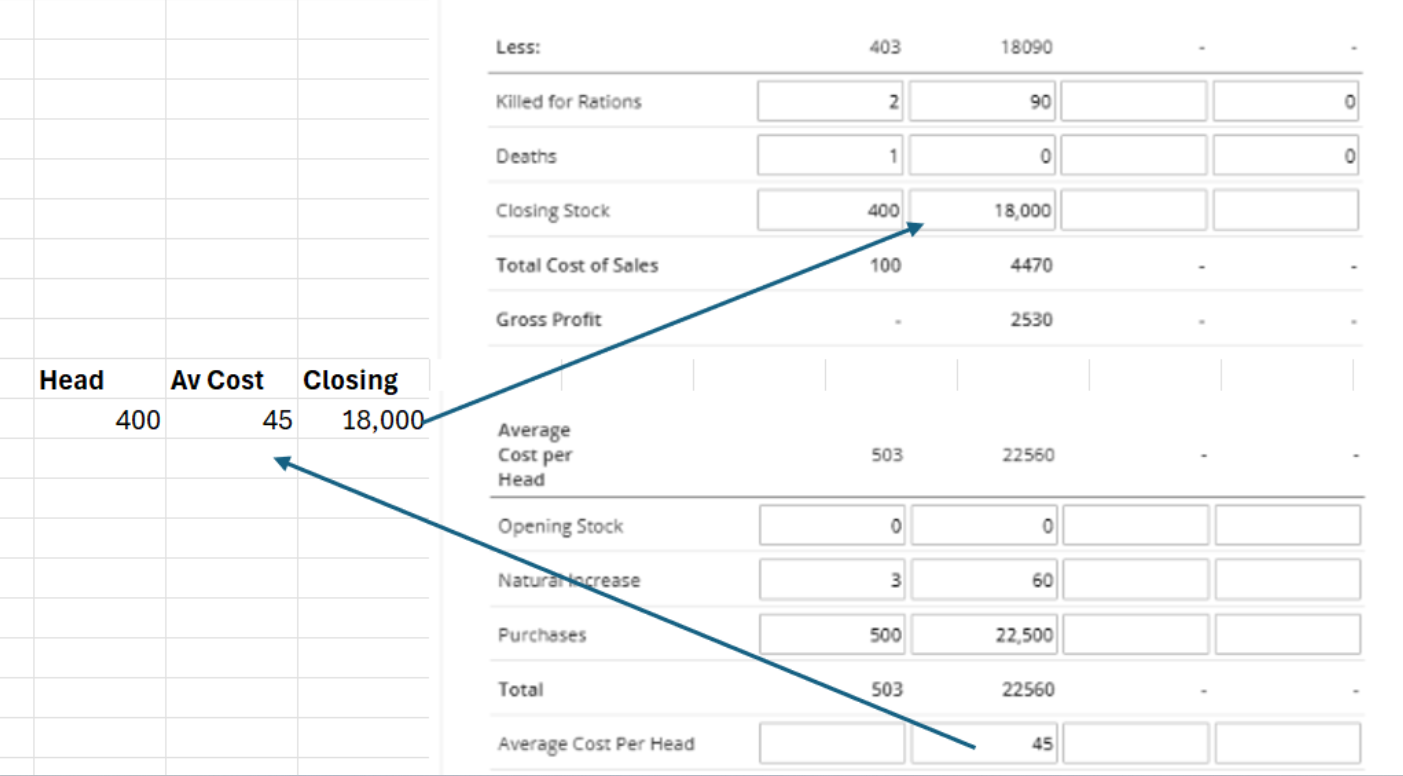
*Average cost per head is the total cost/head
*Closing Stock is average cost per head x head on hand (see attached excel)
Average Cost Display (Informational Rounding) At the bottom of the schedule, the "Average Cost Per Head" field displays as a rounded whole dollar amount ($45). Because this schedule operates on exact column arithmetic (simply adding and subtracting the specific values in the column above), this average cost is purely an informational display. It represents your Total Stock Available ($22,560) divided by the Total Head (503), rounded for visual simplicity. It is not used as a hidden multiplier to calculate your Closing Stock or Rations; rather, those column values are simply subtracted from the available pool to find your exact Cost of Sales.
(And if you still need the Cost of Sales Header text, here it is adjusted to match that same simple logic):
Cost of Sales Header Roll-up In the middle deductions block, the top parent header titled "Cost of Sales" mirrors the "Total Stock Available" baseline ($22,560), rather than displaying the netted deduction. This is strictly a hierarchical presentation in the UI. The engine simply subtracts your explicit deductions ($18,090) from that available pool to arrive at the true Cost of Sales deduction of $4,470. This $4,470 is clearly isolated on the "Total Cost of Sales" line directly above your Gross Profit calculation, and it is this exact figure that flows to the face of your Profit & Loss statement.