
If you are preparing a financial report for a Company entity, then by default, you can find the Income Tax Expense line item in the "Statement of Changes in Equity" section
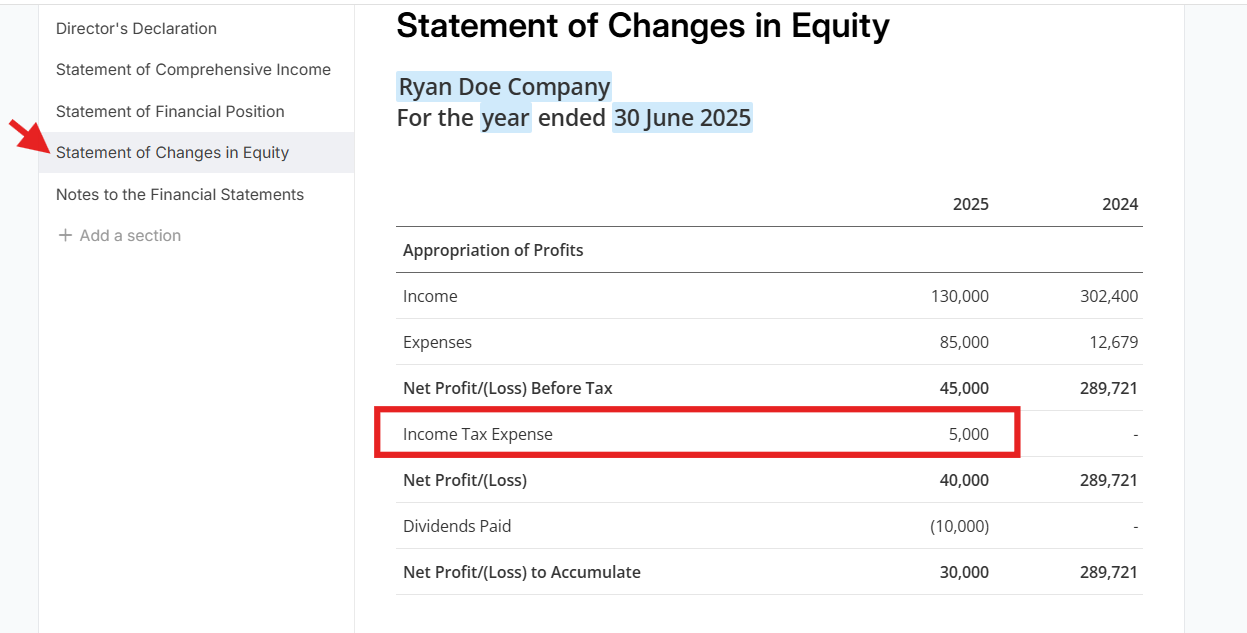
If the "Income Tax Expense" is Still Missing
It could be due to one of the following reasons:
Data Import Issue:
- Ensure that the ledger data for FY2026 has been correctly imported into Lodgeit. You can refer to the General Importing Financials Guide for assistance.
Mapping Issue:
- Verify that the accounts related to income tax expense have been correctly mapped in the system. If the accounts are not mapped, the data may not appear in the report.
- Correct treatment. Income Tax Expense is normally an accounting/bookkeeping expense representing the tax liability of the entity. For tax-return purposes, income tax expense is generally non-deductible.
Report Template Issue:
- Check if the report template you are using includes the "Income Tax Expense" line item. If not, you may need to modify the template. Refer to the Managing Financial Report Statement Templates Guide for instructions on how to customize your report template.
Adjustments Not Processed:
- Ensure that all year-end adjustments, including those for income tax, have been processed into the ledger file before generating the report.