
Lodgeit lodges, prefills and validates forms through the ATO's Standard Business Reporting (SBR) service. Before it can do this for you, tell the ATO that Lodgeit is your hosted SBR software service provider. You do this once, in ATO Access Manager, with the Software ID that Lodgeit gives you. Then test the connection in Lodgeit.
In this article
- Before you start
- Copy your Software ID
- Notify the ATO in Access Manager
- Test the connection
- If the test shows a message
- Common questions
- Related articles
Before you start
- You are an owner or administrator of the Lodgeit organisation. Other team members do not see the ATO Software ID page.
- Your organisation's ABN is entered in Lodgeit. For a tax or BAS agent, the Tax/BAS Agent Number is entered too, and both match ATO records.
- You have a myID with Standard or Strong identity strength, and it is linked to the practice or business in Relationship Authorisation Manager (RAM).
Copy your Software ID
The Software ID is a 10-digit number that tells the ATO which Lodgeit organisation is sending your forms. Each Lodgeit organisation has its own.
-
In Lodgeit, open Settings, then select ATO Software ID.
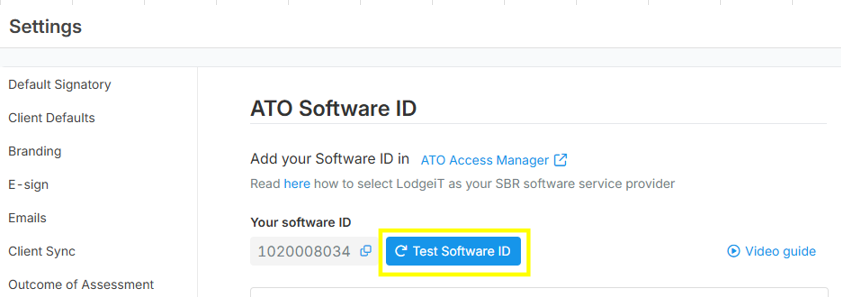
- Under Your software ID, select the copy icon next to the number.
- Select ATO Access Manager to open Access Manager in a new tab.
Notify the ATO in Access Manager
- Sign in to ATO Access Manager with your myID. If you can act for more than one business, choose the practice or business that lodges through Lodgeit.
- In the menu on the left, select My hosted software services. Some screens show it as My hosted SBR software services.
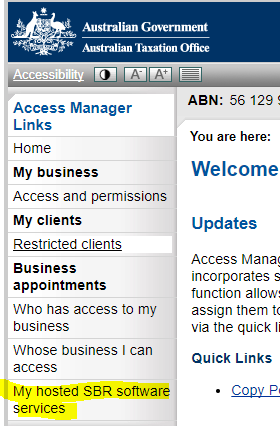
- Select Notify the ATO of your hosted service.
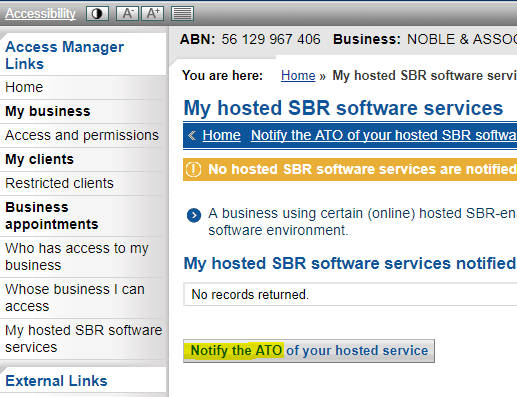
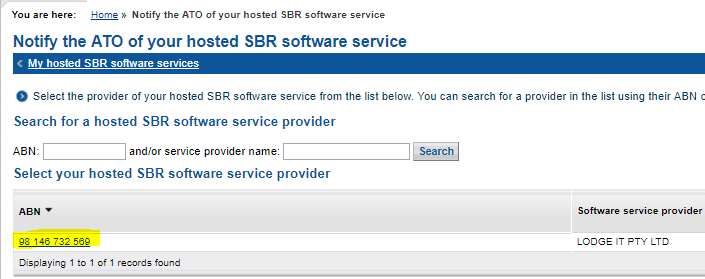
- In the ABN field, enter Lodgeit's ABN
98146732569, then select Search. - In the results, select the ABN link 98 146 732 569 next to LODGE IT PTY LTD.
- Paste your Software ID into Add Software IDs, then select Next.
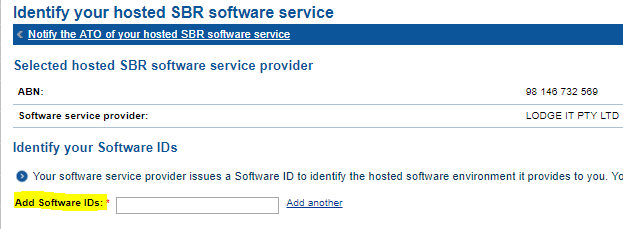
- Read the Notification statement, then select Save.
Access Manager confirms the notification, and LODGE IT PTY LTD appears in your list of hosted software services with the status Active. For the ATO's own instructions, see Access Manager for business software users.

Test the connection
- Go back to the ATO Software ID page in Lodgeit.
- Select Test Software ID.
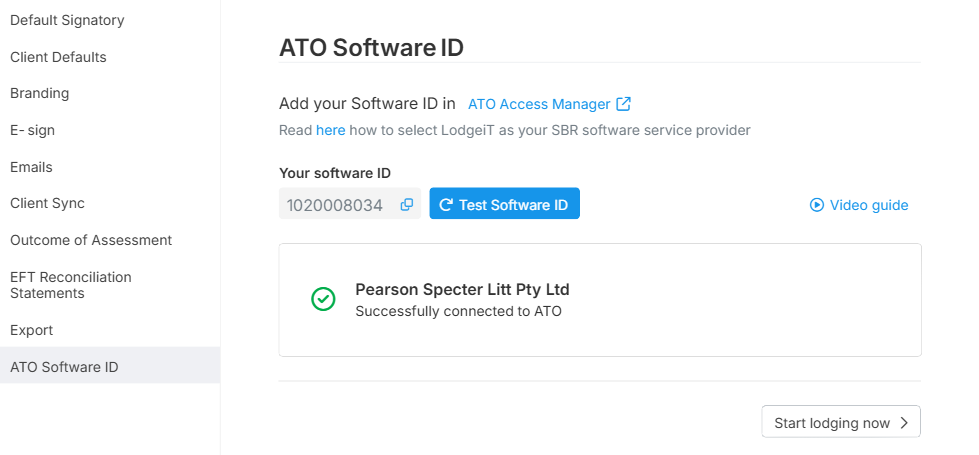
Lodgeit checks the connection with the ATO and shows a result for each organisation in the list. Successfully connected to ATO means you are ready to lodge.
For a practice, the list shows the practice. For a business, it also shows each of its clients that is not an individual and not archived, and each of them needs its own notification in Access Manager, made with its ABN.
If the test shows a message
| Message | What to do |
|---|---|
| LodgeiT is not selected as your SBR software service provider | Lodgeit shows this for every organisation until you select Test Software ID. If it is still there after the test, the ATO has no notification for this ABN. Complete Notify the ATO in Access Manager for this ABN, then test again. |
| An incorrect Software ID was entered in ATO Access Manager. Please verify and correct it | In Access Manager, select My hosted software services, then the ABN link for LODGE IT PTY LTD. Remove the wrong Software ID, add the one from your ATO Software ID page, then select Next and Save. |
| Length of the software ID must be 10 characters. Please verify and correct it | Copy the Software ID again with the copy icon and correct it in Access Manager in the same way. |
| Please fill in the ABN in organisation settings | Select organisation settings in the message, enter the ABN and save. Then test again. |
| The ABN is invalid. Please enter a valid ABN in organisation settings and try again | Check the ABN in your organisation settings against the ABN Lookup, correct it and test again. |
| Registered Agent Number (RAN) does not match the ABN or credential. Please check and correct it | Check that the Tax/BAS Agent Number and the ABN in your organisation settings are the ones the ATO holds for your practice. If they are, check the agent number and ABN combination in Access Manager. For more help, phone the ATO Technical help desk on 1300 287 539. |
| Your credential is not linked to this RAN in ATO Access Manager. Please verify the link | Your myID is not authorised for your practice's agent number. Ask the authorisation administrator of your practice to authorise your credential for this agent number and set up your permissions in Access Manager. |
| An unexpected error has occurred on ATO side. Please try later | This is often a timeout at the ATO. Test again. |
| Unable to connect to the ATO at the moment | Lodgeit could not reach the ATO. Test again later. |
Still not connected?
Contact support and include a screenshot of the ATO Software ID page after the test and a screenshot of My hosted software services in Access Manager.
Common questions
I get SBR.GEN.AUTH.006 when I lodge. What does it mean?
The full message starts with A notification does not exist for your software provider. The ATO has no notification for Lodgeit from the ABN that is lodging. Run the test on the ATO Software ID page to see which organisation is not connected, then notify the ATO for that ABN. See which ABN needs the notification.
Which ABN needs the notification: mine or my client's?
A tax or BAS agent practice notifies the ATO once, with the practice ABN. Your clients do not need to do anything in Access Manager.
A business that lodges for itself notifies the ATO with its own ABN. If it lodges for more than one entity, such as a company and a trust, each entity with its own ABN needs its own notification.
I have more than one Lodgeit organisation. Is the Software ID the same?
No. Each Lodgeit organisation has its own Software ID. Copy it from the ATO Software ID page of each organisation and add each one in Access Manager.
The organisation has a new ABN. Do I need a new Software ID?
No. Your Software ID stays the same. Update the ABN in Lodgeit, sign in to Access Manager under the new ABN and notify the ATO again with the same Software ID. Then test the connection.
Does this replace software I already notified in Access Manager?
No. Access Manager keeps every provider you notify. Lodgeit is added to the list, and the others stay active.
The ATO says my machine credential is expiring. Does Lodgeit need one?
No. Lodgeit is hosted software and connects through the notification in Access Manager. The ATO uses machine credentials for desktop or locally hosted software.
Can I notify the ATO without Access Manager?
Yes. Phone the ATO on 1300 852 232 and give them Lodgeit's name, Lodgeit's ABN and your Software ID. See SBR connection to ATO via phone.