
Case: Cannot link to ATO.
Error: "Lodgeit is not selected as your SBR software service provider"

Guidance: There could be several reasons why you are unable to connect Lodgeit to the Australian Taxation Office (ATO). Below are the common issues and their solutions:
1. Incorrect Practice Type
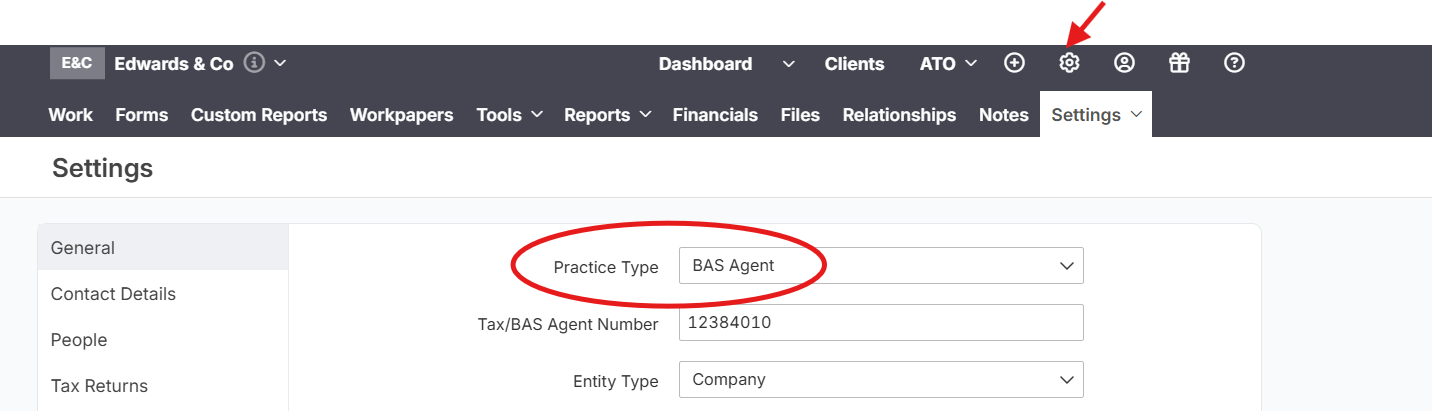
Ensure your business or firm's "Practice Type" is correctly set in Lodgeit. Here's how to check:
Steps:
- Navigate to Settings:
- Click the Gear Wheel icon (⚙️) in the top navigation bar.
- Select Profile from the dropdown menu.
- Access General Profile Information:
- On the left-hand navigation panel, click General.
- Verify "Practice Type":
- Locate the Practice Type field and ensure it is correctly set (e.g., BAS Agent, Tax Agent, etc.).
2. Mismatch in ABN or TFN
the ABN or TFN must match between the ATO portal and Lodgeit for successful integration. Consistency in these details is critical because the ATO uses this information to validate the connection and ensure that the correct entity is being linked to Lodgeit.
3. Client Not Linked in ATO Access Manager
If your client is not linked to your account in the ATO Access Manager, you won't be able to connect Lodgeit.
Steps to Check:
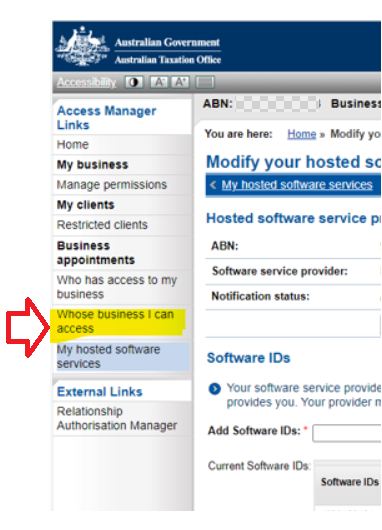
- Access ATO Access Manager:
- Log in to your ATO online services account.
- Navigate to Whose business I can access under Access Manager Links.
- Verify Client Access:
- Check if your client (e.g., "Doe Pty Ltd") is listed.
- If not, ask your client to add you in their ATO Access Manager.
Check this guide Connect Lodgeit to ATO