
Create legal documents for your clients from a Lodgeit template or a blank page. Placeholders fill in the client's details, and you can send the finished document for e-signature. Drafting and editing are free: a document uses a credit only when you complete, export or print it. To see what each Lodgeit template contains, read Legal document templates.
In this article
- Before you start
- Create a document for a client
- Edit the document
- Complete, sign and export
- Create your own template
- Common questions
Before you start
- Your team role lets you edit the client's work. Sending for e-signature and publishing need their own permissions.
- You have a legal document credit for each document you plan to complete, or you can buy credits on the Billing page, which also shows the prices.
Create a document for a client
- Open the client and select Custom Reports in the top menu.
- Select Add report.
- Select Legal Document.
- Choose a template, or select Blank document to start from scratch.
- Enter the Document Name. If a period field appears, choose the period. Select Create.
- The first time you open a legal document, Lodgeit shows the Disclaimer of Liability for Legal Document Templates. Read it, tick the box and select Confirm.

Edit the document
Lodgeit saves your changes as you work. Editing is free until the document uses a credit.
- To add client details, type
@in a text block and choose a placeholder, such as the client's name, ABN, address or the financial year. Lodgeit fills it in from the client's details. - To add content, select + between two blocks and choose a block: Text, Heading 1, Heading 2, Section, Agent Signature, Client Signature or Page Break. Page Break starts a new page at that point.
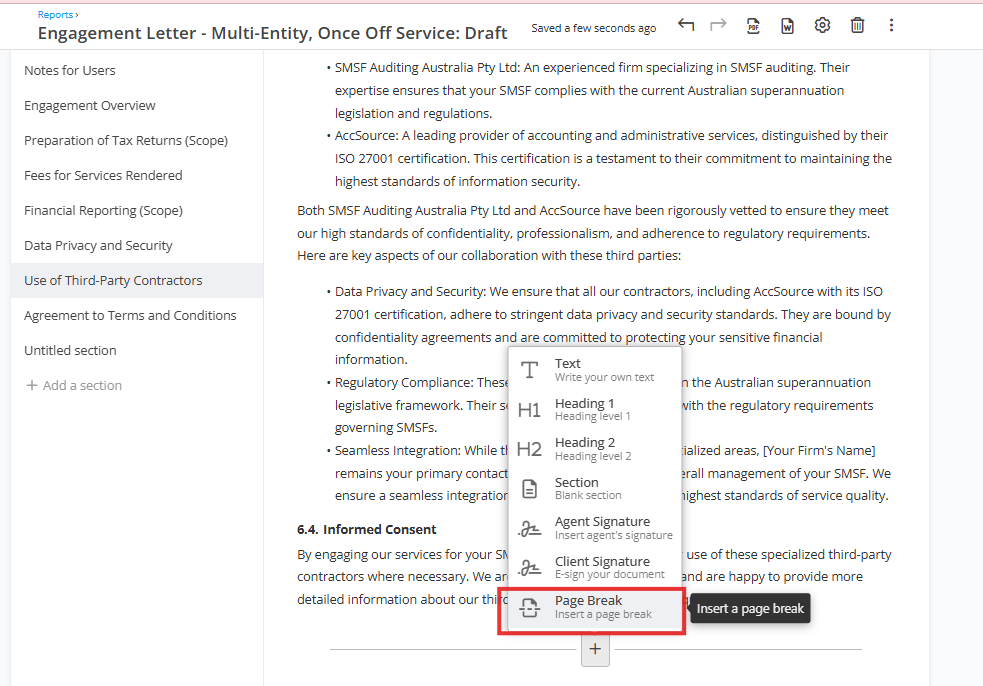
- To number headings, select a heading and turn on Numbered heading in its toolbar. You can also restart the numbering at a number you choose.
- To add a section, select Add a section in the left panel.
- To change the document title, entity type or period, select Settings in the toolbar.
Complete, sign and export
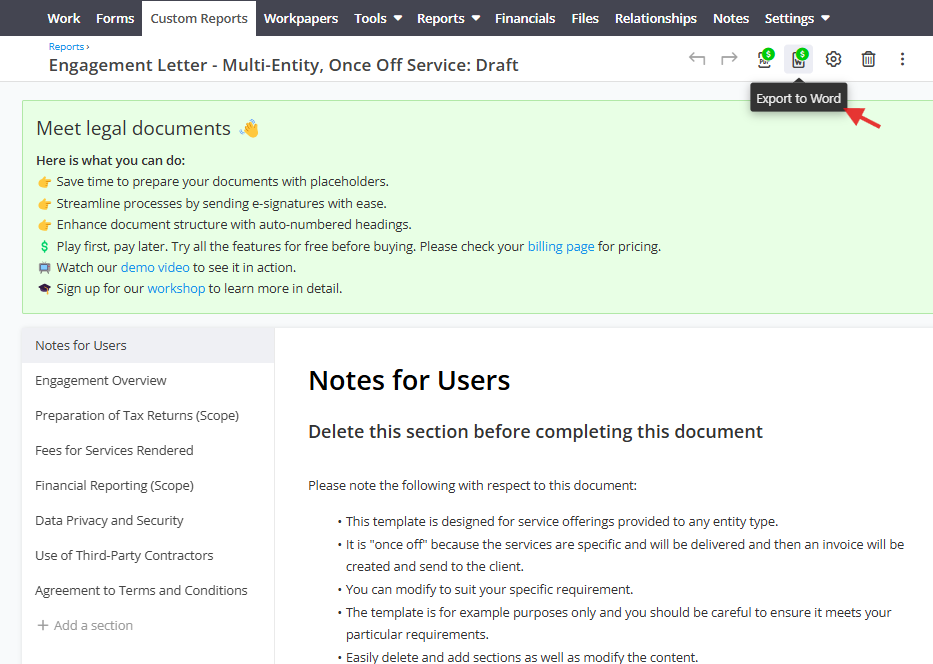
Buttons that use a credit show a dollar badge. A document uses one credit at most: the first action that needs a credit uses it, and later actions on the same document are free.
- Review the document and select Complete.
- If Lodgeit asks Use a credit?, select Use credit. To skip this question next time, tick Don't ask me again. If you have no credits left, buy more on the Billing page.
- To send the document for signing, select Request e-signature and follow the prompts. E-signing a legal document is free.
- When the document is signed, open the ⋮ menu and select Download Signed Copy.
- Select Publish to finalise the document. You cannot delete a published document.
To change a completed document, select Unlock. Unlocking does not use another credit.
Export to Word or PDF
Select Export to Word or Export to PDF in the toolbar. The Word file lets you change the formatting and branding outside Lodgeit. If the document has not used a credit yet, exporting uses one.
Create your own template
Your templates appear in the template list for every client in your organisation.
- Select the gear icon, then Report Templates.

- Select Legal Documents.
- Select Blank template to start from scratch. To start from a copy of a Lodgeit template, point to it and select Create custom template.

- Select Settings in the toolbar.

- Enter the title, then choose the entity type and default period. The entity type sets the group the template appears under in Report Templates.

- Add sections and blocks as described in Edit the document. Lodgeit saves the template as you work.
The template now appears under Legal Documents with the date and the name of the person who last changed it. To copy one of your templates, point to it and select Duplicate.

Common questions
When does a document use a credit?
The first time you complete, export or print it. Drafting and editing are free. A document never uses more than one credit, even if you unlock it and complete it again.
Do legal document credits expire?
Credits bought on an annual plan expire at the end of the subscription year. Credits bought on Business On Demand do not expire.
Does e-signing a legal document cost extra?
No. E-signing legal documents is free and unlimited.