
Lodgeit can add a team member's signature to printed and e-signature copies of tax forms and to the compilation report in financial reports. Each team member uploads their own signature image to their profile, and you choose on the Default Signatory page whose signature Lodgeit uses. You do not need a signature to lodge a form electronically.
In this article
- Before you start
- Upload your signature
- Choose who signs
- Add the signature to a tax form
- Sign a financial report
- Change the text under the signature
- Common questions
- Related articles
Before you start
- Your practice type is Tax Agent or BAS Agent. Tax forms show the signature option only for agent practices.
- You have a picture of your signature in JPEG, PNG, BMP or SVG format, preferably with a transparent background.
- To choose who signs, you are an owner or administrator of the Lodgeit organisation.
Upload your signature
- Select the profile icon in the top-right corner, then select Account.
- Under Signature, select Choose Signature File.
-
Select the picture of your signature. Lodgeit shows it under Signature.
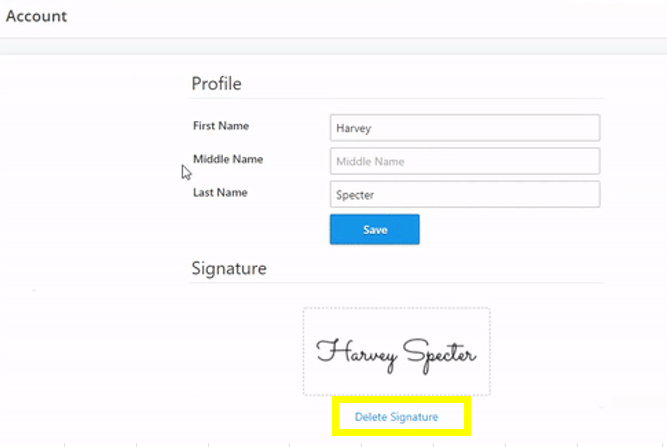
To replace your signature, select Delete Signature, confirm, then upload the new picture.
Choose who signs
- Open Settings, then select Default Signatory.
- To have each client's owner sign their forms and reports, select Use client owner as signatory.
- In Default signatory, start typing a team member's name and select them from the list. Lodgeit uses this person for every client, or for clients without an owner when the option in step 2 is selected.
- Select Save.
For more detail, see Default signatory.
Add the signature to a tax form
When you print a form or send it for e-signature, select Include tax agent signature under Options. Lodgeit adds the signatory's signature to the declaration on the form. The option is selected automatically when the signatory has uploaded a signature, and it needs Lodgment declaration to be selected too. Activity statements do not have this option.
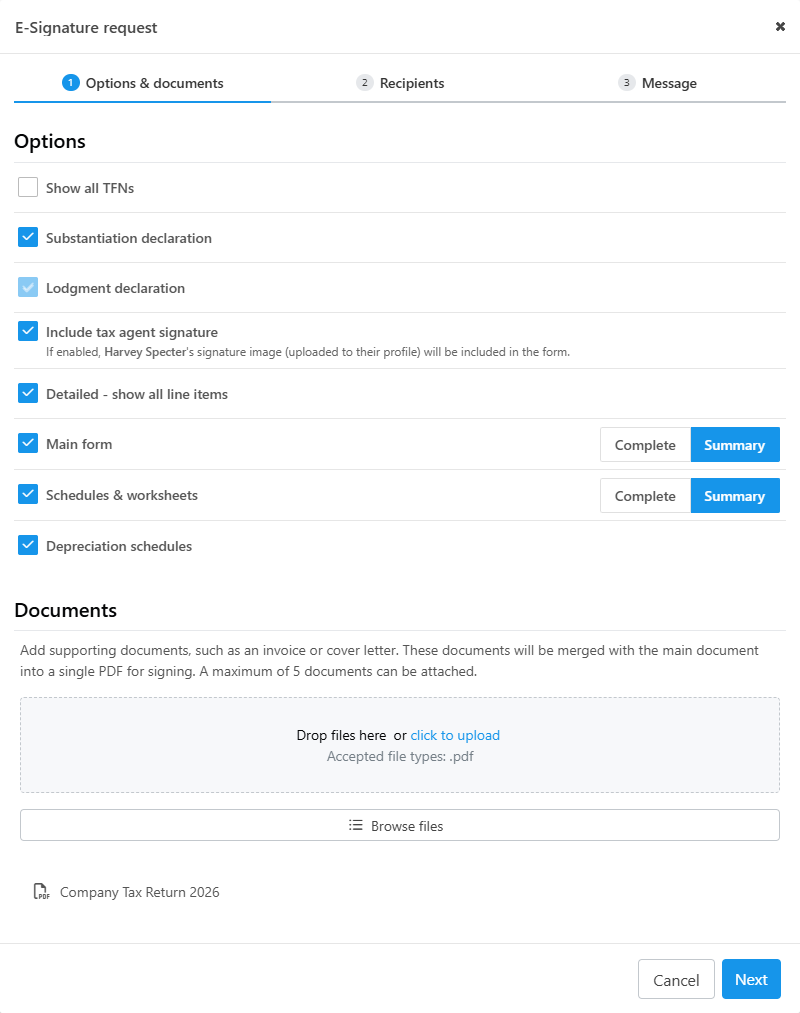
If the option is greyed out, Lodgeit shows one of these messages under it.
| Message | What to do |
|---|---|
| Client owner or default signatory is not set | Select set it up here in the message and choose who signs. |
| No signature found. Contact … to add one. | The signatory has not uploaded a signature. Ask them to upload their signature. |
Sign a financial report
When you create a financial report, Lodgeit adds the signatory's signature to the Agent Signature block of the compilation report, if the signatory has uploaded one. To add or change the signature yourself:
- Open the financial report and go to the compilation report.
- In the signature block, select Insert signature, or select the signature to change it.
- In Select Signatory, start typing a team member's name and select them, then select Sign.
-
To change the date, select it and pick a new one. Without a date, the block shows Select date.
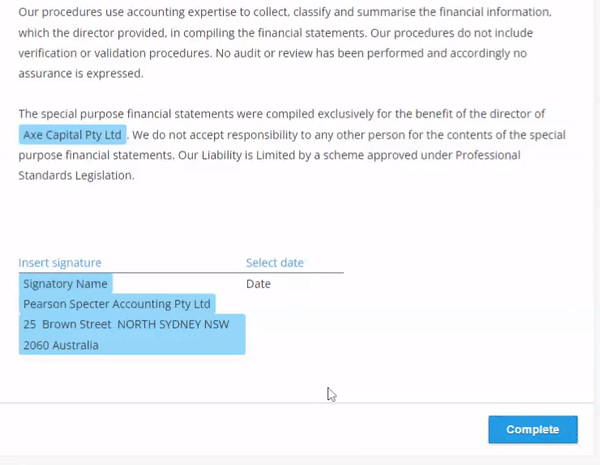
You can sign on behalf of a colleague, as long as they have uploaded a signature.
Change the text under the signature
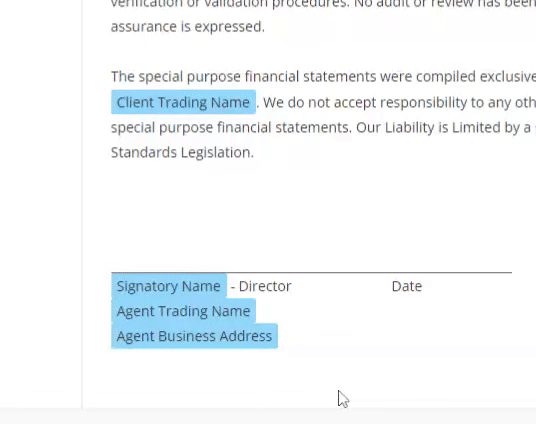
The text under the signature, such as the signatory's name and the practice address, comes from the report template.
- Create your own template from a predefined financial report template.
- Open the compilation report, scroll to the signature block and select the text under it.
- Replace the text. Type
@to insert a placeholder, such as the signatory name or the practice address. -
Repeat this in the template for each entity type.
Common questions
Do I need to sign a form before I lodge it electronically?
No. When you select Sign on the form, Lodgeit shows the declaration, and you select Sign or Sign & lodge. Lodgeit signs the declaration with the ATO credentials it uses, so you do not need a signature picture. This is the same for a tax agent and for a public officer lodging their own company's return. The signature picture appears only on printed and e-signature copies.
Our practice has several owners. Can each of them sign their own clients' work?
Yes. On the Default Signatory page, select Use client owner as signatory. Lodgeit then uses the signature of the team member assigned as each client's owner.
Why don't I see Include tax agent signature?
The option is only for organisations with the practice type Tax Agent or BAS Agent, and not for activity statements.