
As a member of the QuickBooks ProAdvisor program who is a registered tax agent or BAS agent, you can use Lodgeit for free as a ProAdvisor benefit. Your ProAdvisor tier sets how many lodgements you get, and Intuit lists the allowance for each tier on the program page. You start the activation in QuickBooks Online Accountant and finish it in Lodgeit, either with a new Lodgeit account or with one you already have.
In this article
- Before you start
- Start in QuickBooks
- Activate with a new Lodgeit account
- Activate with an existing Lodgeit account
- After activation
- If activation fails
- Common questions
- Related articles
Before you start
- You need a QuickBooks Online Accountant account that is enrolled in the ProAdvisor program. Signing up to QuickBooks Online Accountant is free.
- You need a tax agent number (TAN) or BAS agent number (BAN). Your Lodgeit organisation must have Practice Type set to Tax Agent or BAS Agent.
- Use your practice's own QuickBooks Online Accountant file, not a client's company file. The file must not be connected to a client in Lodgeit.
- If your Lodgeit organisation has a paid plan, the organisation owner must cancel it on the Billing page first. Lodgeit cannot activate the ProAdvisor benefit while a paid plan is active. Read moving from a paid plan before you cancel.
- The benefit is not available under a franchisee licence.
- One QuickBooks practice file activates one Lodgeit organisation.
Start in QuickBooks
- Sign in to QuickBooks Online Accountant at qbo.intuit.com.
-
Select ProAdvisor in the left menu, then open the Benefits tab.

-
In the QuickBooks Tax powered by LodgeiT row, select Activate.

-
When Intuit asks to share your profile information with QuickBooks Tax Powered by LodgeiT, select Authorize.

Lodgeit opens the Sign in with Intuit page. Continue with the section that matches your situation.
Activate with a new Lodgeit account
- On the Sign in with Intuit page, select Create new account.
- Enter your first name, last name and email, then select Confirm.
-
Complete the second sign-in step, which every Lodgeit account needs. If Lodgeit shows a QR code, scan it with your authenticator app, enter the 6-digit code, then select Confirm. If Lodgeit asks for a code sent by SMS, enter the code from your phone instead.

-
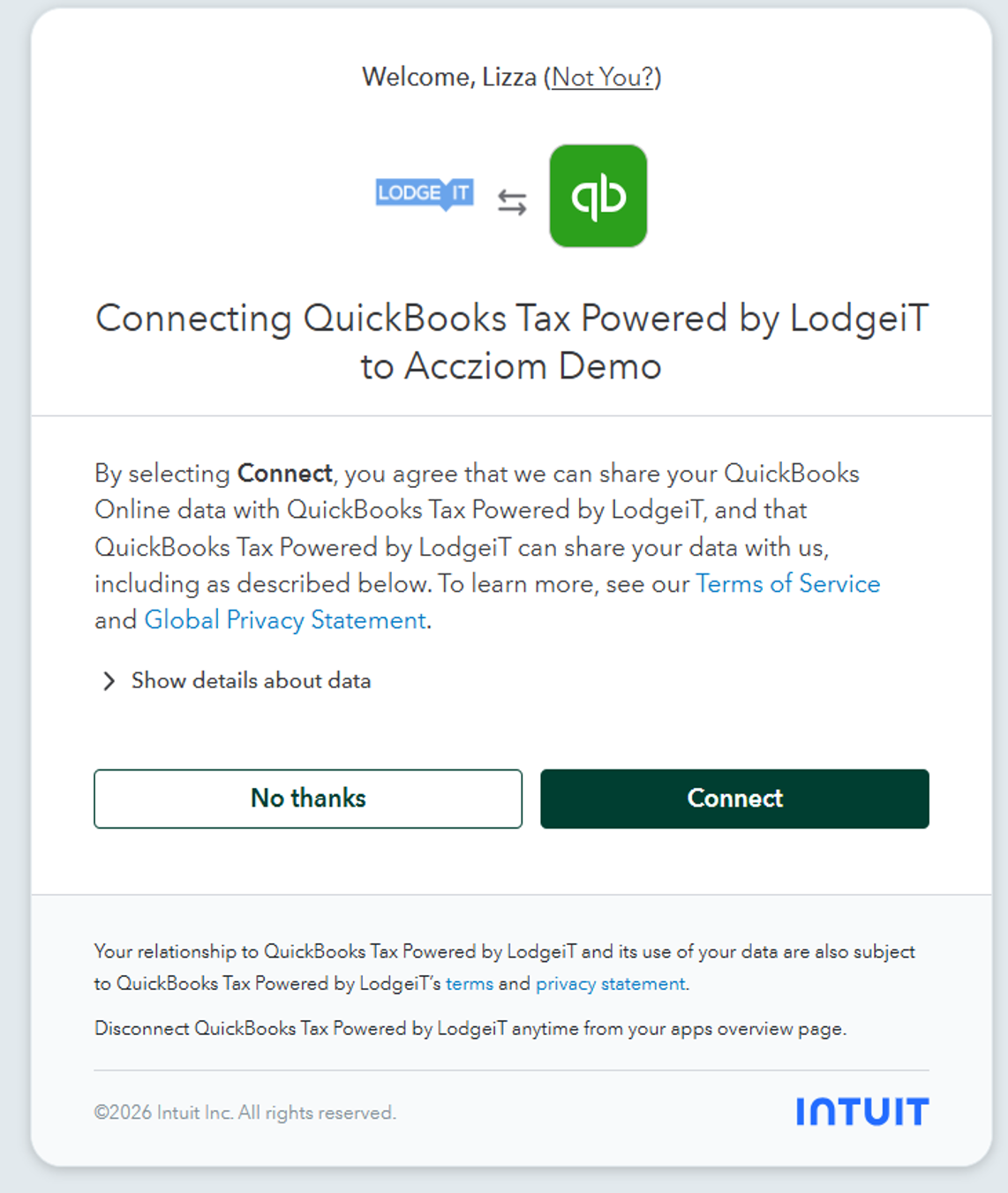
On the Intuit page, select Connect to let Lodgeit read your QuickBooks practice file.
- On the New organisation from QuickBooks page, select Tax Agent or BAS Agent under Practice Type, and enter your Tax/BAS Agent Number.
- Check the practice details that Lodgeit copied from QuickBooks, then select Create.
Lodgeit creates your organisation and activates the benefit. See After activation.
Activate with an existing Lodgeit account
You must be an owner or administrator of the Lodgeit organisation you want to use.
- On the Sign in with Intuit page, select Link existing LodgeiT account, then sign in to Lodgeit.
- On the Intuit page, select Connect.
- When Lodgeit asks Which organisation would you like to connect to?, choose your organisation, then select Connect.
If your organisation is already connected to this QuickBooks practice file, Lodgeit skips step 3 and activates the benefit straight away.
After activation
Lodgeit opens the Welcome to LodgeiT page and confirms which ProAdvisor tier is now active.

- To check the benefit later, open the Billing page. Your plan shows as QuickBooks ProAdvisor followed by your tier, with its expiry date.
- Keep your Lodgeit organisation connected to your QuickBooks practice file. Lodgeit uses the connection to check your ProAdvisor tier, renew the plan and change it when your tier changes. If the connection stops working, Lodgeit deactivates the plan after 24 hours. See why Lodgeit says your subscription will be deactivated.
If activation fails
If Lodgeit cannot activate the benefit, it shows one of these messages.
| Message | What to do |
|---|---|
| You already have an active subscription. You must cancel it in order to activate the QuickBooks ProAdvisor … subscription. | The organisation has a paid plan. Read moving from a paid plan, cancel the plan, then select Activate in QuickBooks again. |
| The subscription for the … is already in use by another organisation. Please check that you are connected to the correct LodgeiT organisation. | This QuickBooks practice file has already activated the benefit for another Lodgeit organisation. Switch to that organisation, or contact support to move the benefit. |
| You cannot activate the QuickBooks ProAdvisor benefits as the selected QuickBooks file is connected to a client. Please remove the connection and try it again. | You chose a client's company file. Start again and choose your practice file. |
| In order to activate the QuickBooks ProAdvisor benefits the selected QuickBooks file must have an Accountant feature. | The file you chose is not a QuickBooks Online Accountant practice file. Start again and choose your practice file. |
| To activate the QuickBooks ProAdvisor benefits, please ensure your practice type is set as Tax Agent or BAS Agent. | In Lodgeit, go to Settings > General, set Practice Type to Tax Agent or BAS Agent, and save. Then select Activate in QuickBooks again. |
| You are not eligible for a free subscription or discount under QuickBooks ProAdvisor program. | Intuit did not return a ProAdvisor membership for this QuickBooks login. Check that you joined the program and that your tier shows on the Benefits tab in QuickBooks, then try again. |
| The subscription plan QuickBooks ProAdvisor Silver has already been used once and no longer available to subscribe or renew. | The Silver benefit has been used. Move to a higher ProAdvisor tier, or choose a paid Lodgeit plan. |
| You cannot use QuickBooks ProAdvisor benefits under a franchisee licence. | The benefit is not available for franchisee organisations. |
If you see a different message, or the Activate button does nothing, contact support. Include a screenshot, your ProAdvisor tier and your QuickBooks Company ID.
Common questions
Why does Lodgeit say my subscription will be deactivated?
Lodgeit regularly checks your ProAdvisor status through the QuickBooks connection. If the check fails, Lodgeit shows Your QuickBooks ProAdvisor … subscription will be deactivated in …, sends an email, and deactivates the plan after 24 hours. Usually the QuickBooks connection has expired, or the organisation is connected to a different QuickBooks company, such as a client's file.
To fix it, select here in the warning, or go to Settings > Import, and reconnect your QuickBooks practice file. If the plan was already deactivated, reconnecting restores it.
Do I need to renew the benefit every year?
No. Lodgeit renews the plan automatically while the organisation stays connected to your practice file and you remain a ProAdvisor. The Silver tier is the exception: it gives 12 months of access once. After that, move to a higher ProAdvisor tier or choose a paid Lodgeit plan.
My ProAdvisor tier changed. Do I need to activate again?
No. Lodgeit picks up the new tier automatically, usually within a day. If the Billing page still shows your old tier after that, select Activate on the Benefits tab in QuickBooks again.
Lodgeit asks me to buy lodgment credits. I thought lodgements were included?
Lodgeit shows You have to buy lodgment credits in order to lodge this form. when the organisation has no lodgements left for that form. Check these in order.
- You are working in the organisation that has the benefit. Its Billing page shows the QuickBooks ProAdvisor plan.
- The plan has not been deactivated. See why Lodgeit says your subscription will be deactivated.
- You have lodgements left in your tier. If not, earn enough ProAdvisor points for a higher tier, or buy extra lodgements on the Billing page.
The benefit went to the wrong organisation. Can I move it?
One QuickBooks practice file activates one Lodgeit organisation, and you cannot move the benefit yourself. Contact support with the names of both organisations and your QuickBooks Company ID. Do the same if your practice has restructured and you need the benefit on a new organisation.
I already pay for Lodgeit. Can I switch to the benefit and get a refund?
You can switch at any time by cancelling the paid plan and activating the benefit. Cancelling ends the paid plan straight away, along with any lodgements left on it.
Whether we refund the paid plan depends on when you bought it:
- Bought before you became a ProAdvisor: no refund. You can keep using the paid plan until it ends or you run out of lodgements, then cancel it and activate the benefit.
- Bought after you became a ProAdvisor, within the last 30 days: full refund.
- Bought after you became a ProAdvisor, more than 30 days ago: we review the request and may refund the lodgements you have not used.
To request a refund, contact support with your Lodgeit invoice, the date you became a ProAdvisor, your ProAdvisor tier and your QuickBooks Company ID.