
Lodgeit renews your QuickBooks ProAdvisor plan and follows your ProAdvisor tier automatically while your practice stays connected to the QuickBooks Online Accountant practice file you activated it with. Use this article if Lodgeit warns that your plan will be deactivated, if the plan has expired, or if your tier has changed. If you have not activated the benefit yet, follow Activate Lodgeit with the QuickBooks ProAdvisor program instead.
In this article
- Before you start
- How renewal and tier changes work
- Fix a deactivation warning
- Renew an expired plan
- Messages and what to do
- Common questions
- Related articles
Before you start
- You need the sign-in details for the QuickBooks Online Accountant account that activated the benefit, and you need to know which practice file it used.
- Your practice organisation's Practice Type must be Tax Agent or BAS Agent. If it is set to Business Entity, Lodgeit cannot renew or change the plan.
- To change the QuickBooks connection in Lodgeit, you need access to your practice's settings. If you cannot see the bin icon or the Connect to QuickBooks tile on that page, ask the organisation owner or an administrator.
- Only the organisation owner can renew an expired plan on the Billing page.
How renewal and tier changes work
Lodgeit checks your ProAdvisor tier through the QuickBooks connection. It checks regularly and again whenever the connection changes.
- When the plan reaches its end date, Lodgeit renews it for your current tier and emails you a confirmation. You do not need to do anything. The Billing page shows no Renew button while renewal is automatic.
- When Intuit moves you to a different tier, Lodgeit changes your plan to match and emails you. If you move to a lower tier and need more lodgements, earn enough ProAdvisor points for a higher tier, or buy extra lodgements on the Billing page.
- The Silver tier gives 12 months of access once and does not renew. When it ends, move to a higher ProAdvisor tier or choose a paid Lodgeit plan.
- If Intuit no longer lists you as a ProAdvisor, Lodgeit cancels the plan and emails you.
- If Lodgeit cannot check your tier, it warns you and deactivates the plan after 24 hours. See fix a deactivation warning.
Fix a deactivation warning
Lodgeit shows Your … subscription will be deactivated in … at the top of the page and on the Billing page, and sends an email with the subject Subscription will be deactivated in 24 hours. This means Lodgeit cannot reach your QuickBooks practice file. Usually the connection has expired, or your practice is connected to a different company, such as a client's file or Xero.
Select here in the warning to open the connection page. You can also go to Settings > Import in your practice organisation. Then follow the section that matches what you see.
If the connection has expired
The page shows The QuickBooks connection is expired. Click here to reconnect.
- Select here in that message.
- Sign in to QuickBooks with your QuickBooks Online Accountant login.
- Choose the same practice file that is shown on the page. If you choose a different company, Lodgeit shows You've chosen the wrong organisation. To connect a different file, use the steps for the wrong company instead.
If the wrong company is connected, or nothing is connected
-
If a company other than your practice file is shown under Details, select the bin icon, then select Disconnect to confirm.
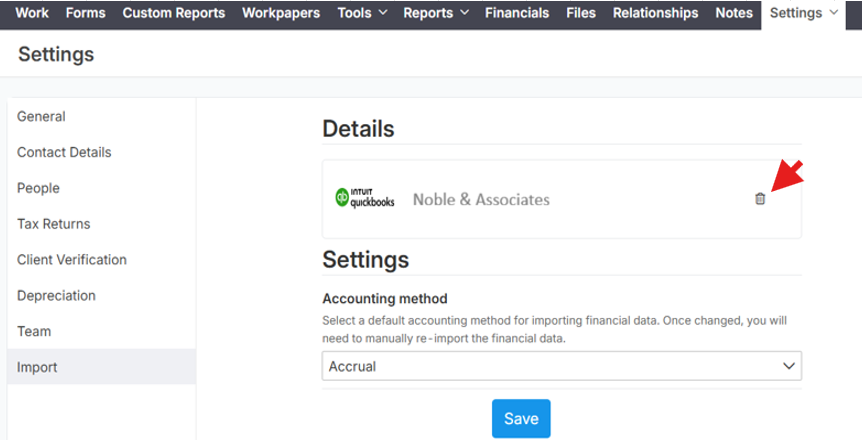
-
Under Accounting Systems, select Connect to QuickBooks.
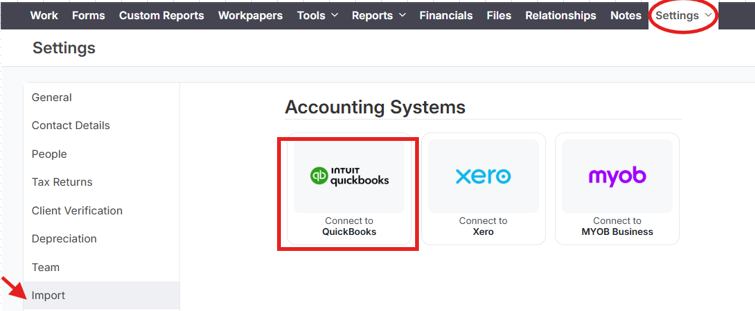
- Sign in to QuickBooks with your QuickBooks Online Accountant login.
-
On Please select your company, choose your practice under Search for a company or firm and tick Install for your firm. Leave Search for a client empty, then select Next.
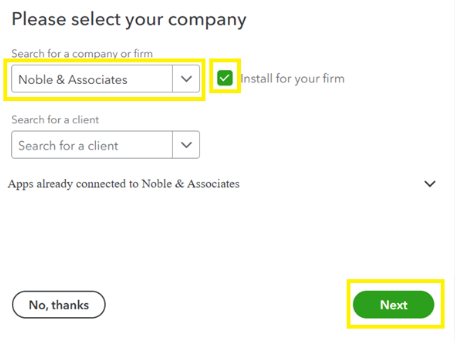
- If Lodgeit says The connection between … and … seems to be wrong, check the QuickBooks company name. If it is your practice file, select It's correct, let's continue. If not, select Choose another company.
After you reconnect
Lodgeit checks your ProAdvisor tier as soon as the connection changes. After a few minutes, refresh the Billing page: the warning should be gone and your plan active again. Reconnecting also restores a plan that has already been deactivated, as long as it has not passed its end date. If it has, renew the expired plan.
Renew an expired plan
If the connection was not working when your plan was due to renew, the plan expires and Lodgeit shows Your subscription has expired.
- Make sure your practice is connected to your QuickBooks practice file. See fix a deactivation warning.
- As the organisation owner, open the Billing page.
-
Under Your subscription has expired, select Renew.

Lodgeit checks your current ProAdvisor tier, starts a new plan for that tier and emails you a confirmation. If it shows a message instead, see messages and what to do.
Messages and what to do
| Message | What to do |
|---|---|
| Your … subscription will be deactivated in … | Reconnect your QuickBooks practice file before the time runs out. See fix a deactivation warning. |
| Your … subscription has been deactivated. | Reconnect your QuickBooks practice file. This restores the plan if it has not passed its end date. |
| Your subscription has expired. To continue using LodgeiT, renew it here. | Reconnect if needed, then renew the expired plan. |
| You don't have an active QuickBooks ProAdvisor connection to check your benefits. Please connect it here and try it again. | The connection is missing or has expired. Reconnect, then select Renew again. |
| You've chosen the wrong organisation. You must connect to '…' or you can connect to another organisation on the Settings page. | You chose a different company while reconnecting. Choose the company named in the message. If that is not your practice file, disconnect it and connect your practice file. |
| The subscription for the … is already in use by another organisation. Please check that you are connected to the correct LodgeiT organisation. | This QuickBooks practice file already gives the benefit to another Lodgeit organisation. Check that you are in the right organisation. To move the benefit, see the benefit went to the wrong organisation. |
| The subscription plan QuickBooks ProAdvisor Silver has already been used once and no longer available to subscribe or renew. | The Silver benefit has been used. Move to a higher ProAdvisor tier, or choose a paid Lodgeit plan. |
| Your subscription … has been cancelled as you are no longer eligible for it under QuickBooks ProAdvisor program. | Intuit no longer lists this QuickBooks login as a ProAdvisor. Check your membership on the Benefits tab in QuickBooks, or choose a paid Lodgeit plan. |
| You are not eligible for a free subscription or discount under QuickBooks ProAdvisor program. | Intuit did not return a ProAdvisor membership for this QuickBooks login. Check that you are signed in with the login that holds your membership. |
If you see a different message, contact support. Include a screenshot, your ProAdvisor tier and your QuickBooks Company ID.
Common questions
My ProAdvisor membership is active. Why does Lodgeit say the plan will be deactivated?
The warning is about the connection between Lodgeit and QuickBooks, not your membership. Lodgeit needs a working connection to your practice file to confirm your tier. Reconnect your practice file and the warning goes away.
I selected Renew, but my plan did not start. Why?
Check your practice's Practice Type. In your practice organisation, go to Settings > General. If Practice Type is Business Entity, change it to Tax Agent or BAS Agent and save, then select Renew again. If the plan still does not start, contact support.
Can I connect Xero or a client's QuickBooks file to my practice?
Not without losing the benefit. Your practice organisation in Lodgeit has one accounting connection, and the ProAdvisor plan needs it to point to your QuickBooks practice file. If you replace it with Xero or a client's file, the plan is deactivated after 24 hours. Connect a client's accounting file to that client's organisation in Lodgeit instead.
I moved to a new QuickBooks Online Accountant practice file. What do I do?
Contact support before you change the connection. Include the names and Company IDs of the old and new practice files, and the name of your Lodgeit organisation.
I have run out of lodgements. What are my options?
Earn enough ProAdvisor points for a higher tier, or buy extra lodgements on the Billing page. See Lodgeit asks me to buy lodgment credits.
Can I get a refund for a paid plan I bought before activating the benefit?
It depends on when you bought the plan. See moving from a paid plan.