Franchise License Purchased but Unable to Manage or Assign It
If you have purchased a Franchise License but cannot manage or assign it, please check the following:
1. Verify the Purchase Dates
Ensure that the QuickBooks ProAdvisor Subscription was activated before or on the same date as the Franchisee License purchase.
Important: The Franchise License depends on an active QuickBooks ProAdvisor Subscription. If the Franchise License was purchased before the QuickBooks ProAdvisor Subscription was activated, it may not function correctly.
2. Check Subscription Validity
The validity of a Franchise License is tied to the main account's subscription status.
Please confirm that:
- Your main account subscription is active.
- The subscription has not expired or been cancelled.
3. Refresh Your Account
If the license was recently purchased, the system may still be updating.
Try the following:
- Log out of your account.
- Log back in.
- Refresh the page and check again.
Still Need Help?
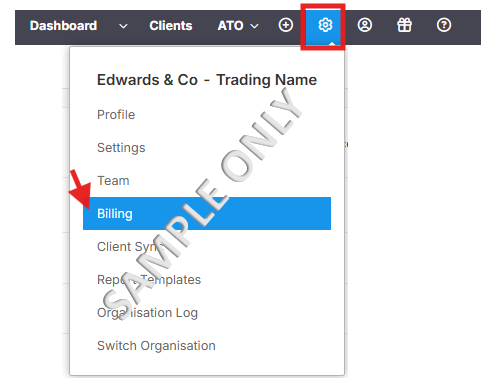
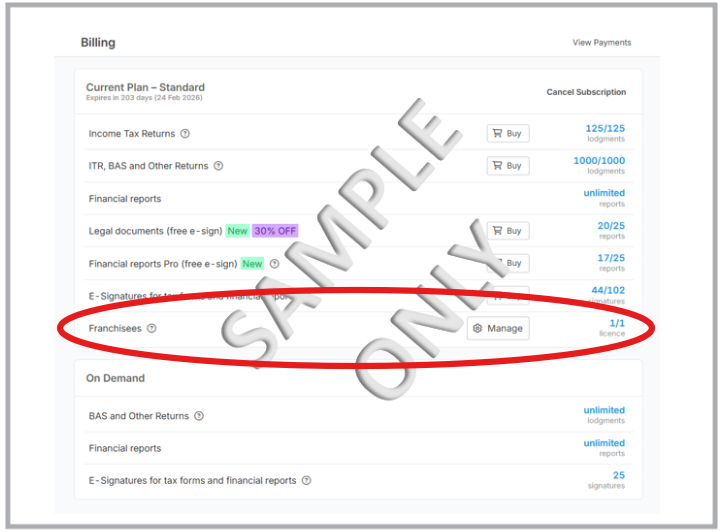
If the issue persists, please send us a screenshot of your Billing page so we can investigate further and assist you accordingly.