Workaround is to edit the imported financials into Lodgeit per guide below:
- Export the imported financials (that was brought-in into Lodgeit via API of QuickBooks, MYOB or XERO) as an Excel Lodgeit Template via this guide: Export imported Lodgeit Financials.
- After that, you need to delete the imported financials in Lodgeit that was pulled using API using the accounting software . Here is the related guide: Removing Imported Financials
- Next step is to disconnect first the accounting software (QuickBooks, MYOB or XERO) connection in Lodgeit. Related guide here: Manage Connection: How to remove accounting software.
NOTE: You can re-connect the accounting software connection again afterwards, if you need to re-import the financials via API on the succeeding year. Related guide here: https://help.lodgeit.net.au/a/solutions/articles/60000609452?portalId=60000042427#Import-financials-using-API
4. Lastly, edit the exported excel Financials with correct figures and then import it into Lodgeit by using this guide: Importing Financials from Excel.
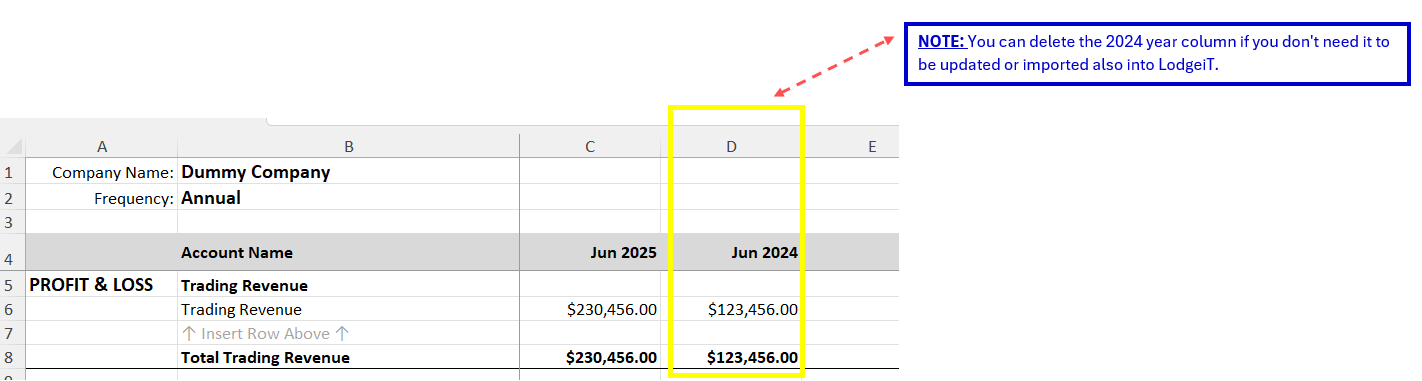
NOTE: You can delete the previous year amount, so that only one year data will be imported in Lodgeit. Please see below image for your reference: